

Overview — What is this template?
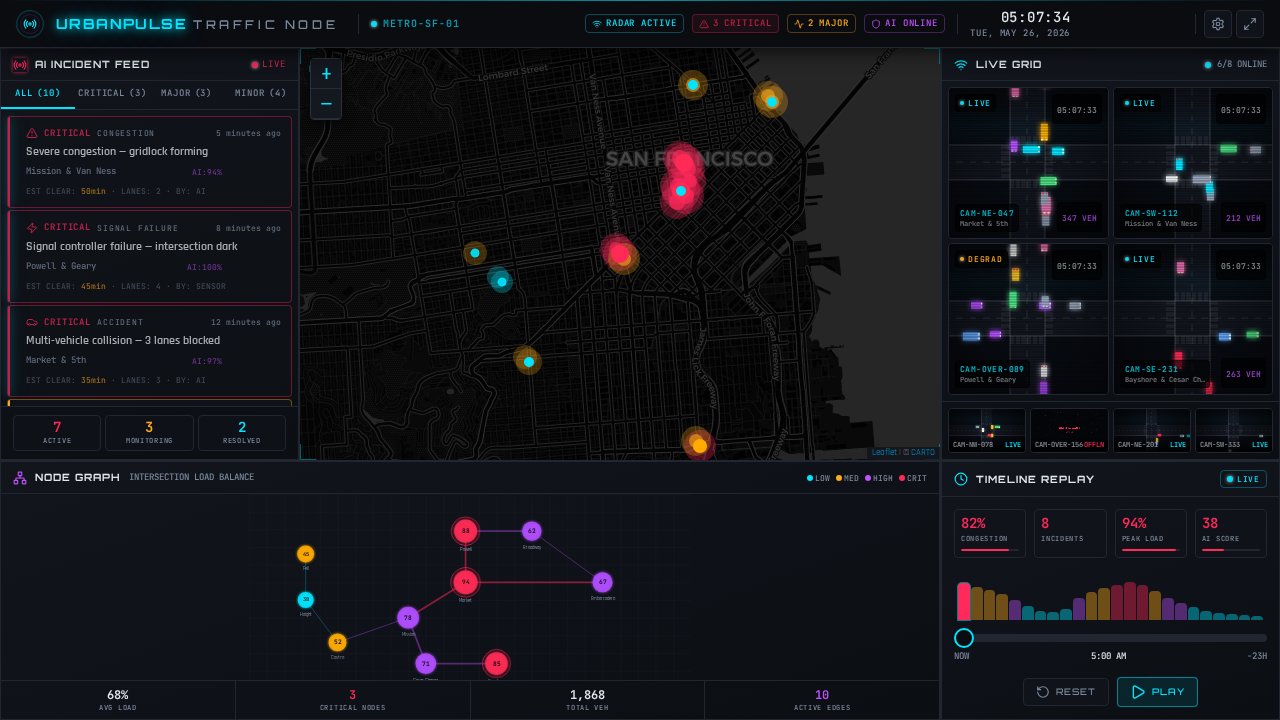
The Free Cinematic Smart City Traffic Dashboard Template is a dark-mode traffic operations cockpit designed for metropolitan planning teams, logistics operators, and smart-city SaaS builders. It provides a cinematic dark-canvas layout with a three-panel architecture: left alerts, center map, and right surveillance grid, allowing urban planners to visualize municipal networks, monitor incidents, and manage signals in real time. This remixable resource is perfect for presenting high-fidelity simulation views of city traffic grids, enabling development teams to demonstrate infrastructure monitoring tools at scale. Spin up your own live visualization hub using the Cinematic Smart City Traffic Dashboard template free on Enter Pro by Converge AI.
Key highlights
- Dark-canvas layout with three-panel architecture
- Leaflet and Carto-based tile map with radial gradient heatmap overlays
- Animated marker pins for active traffic incidents
- Force-directed node graph visualizing intersection load balance
- Timeline scrubber with real-time KPI counters
- Neon accent palette designed for low-light environments
Who is this Cinematic Smart City Traffic Dashboard template for?
- Smart-City Municipal Teams: Government transportation teams needing a tactical, highly visual command-center interface to simulate metropolitan operations.
- Urban Logistics Startups: Fleet operators and logistics platforms that require a high-fidelity monitoring mockup to track asset distribution.
- SaaS Product Designers: Developers pitching traffic management or IoT analytics platforms who need a polished dark-mode dashboard without building from scratch.
Best use cases for a Cinematic Smart City Traffic Dashboard
- Traffic Command Demos: Present a dark-mode traffic monitoring dashboard featuring a live camera grid simulation, node-load indicators, and incident triaging controls for high-stakes stakeholder presentations.
- Smart-City SaaS Pitches: Utilize this design as a client-facing mockup, allowing urban planning software providers to demonstrate automated congestion tracking on a free dashboard interface.
- IoT Fleet Visualization: Adapt the central interactive map with customized radial gradient heatmap overlays to monitor real-time distribution profiles of logistics vehicles or micro-mobility fleets.
How to build with Enter Pro
- Remix the Template: Click the "Remix Template" button on this page to create your own editable copy of the dashboard in your workspace.
- Customize the Command Center: Direct the Enter Agent to configure the layout, update the mock alert cards, customize the map boundaries, and swap out regional location markers to match your target municipality.
- Deploy Your Dashboard: Publish your live web app using the standard one-click release options inside Enter Pro to receive a secure, shareable domain instantly.
FAQ
What are the main features of the Free Cinematic Smart City Traffic Dashboard Template?
The Free Cinematic Smart City Traffic Dashboard Template features a dark-canvas layout with three-panel architecture: a left alert panel, a central map, and a right surveillance grid. Technically, it incorporates a Leaflet/Carto-based tile map with radial gradient heatmap overlays, animated marker pins, a force-directed node graph with four severity tiers, and a timeline scrubber with real-time KPI counters.
Is this traffic monitoring dashboard template free to use for our startup pitch?
Yes, this template is free to remix, customize, and publish. You can use it as a base for your presentations, commercial prototypes, or SaaS design mockups. There are no restrictions on customizing the code, styling, or mapping coordinates to fit your project’s business goals.
Can I customize the map and node graphs without advanced coding experience?
Yes. While the template is pre-configured with a Leaflet/Carto-based tile map, you do not need to write complex CSS or JavaScript to make changes. You can ask Enter Agent to modify the map tile layer, update mock incident descriptions, alter the neon accent colors, or configure intersection node parameters through natural language instructions.
How do I deploy the customized smart-city dashboard to a public website?
Once you have finished customizing your layout, click publish within the editor. Enter Pro will bundle your application and deploy it instantly, providing you with a live, shareable URL. You can also hook up a custom domain from your project settings to align the portal with your organization’s branding.